If your business runs on Salesforce, your contracts already live there in spirit. The opportunity, the account, the contact, the deal terms — all of it sits in a record you’ve spent time getting right. And then, at the moment that actually matters, the signing process asks you to leave: export the data, open a separate eSignature tool, retype or paste the customer’s name and email, upload the document, send it, and later come back to Salesforce to manually mark the deal as signed. Every one of those handoffs is a place for a typo, a stale email address, or a deal that quietly never gets updated.
It doesn’t have to work that way. Here’s how signing inside Salesforce actually works, and the one architectural distinction that determines whether it works well.
The real problem isn’t signing — it’s the handoff
eSignature itself is a solved problem. What isn’t solved, for most Salesforce teams, is the gap between Salesforce and the signing tool. When the two systems don’t truly talk to each other, you get the same small failures over and over: a contract sent to the contact’s old email because someone copied it from a stale tab, a signed agreement sitting in someone’s inbox while the opportunity still shows “negotiation,” a sales ops person spending Friday afternoon reconciling what’s actually been signed against what the CRM thinks.
The cost isn’t dramatic on any single deal. It’s the steady tax of context-switching and manual reconciliation across every deal, multiplied by everyone who touches a contract.
Bolt-on connector vs native managed package
This is the distinction that matters, and most buyers never hear it explained, so here it is plainly.
A bolt-on connector integrates an external eSignature product with Salesforce. The signing tool is a separate application living on its own servers; the connector shuttles data back and forth through an API. It works, but it’s a bridge between two worlds — and bridges have gaps. The signing experience often opens in an embedded frame or a redirect to the external tool, your data makes a round trip outside Salesforce, and the integration depends on that external system staying in sync.
A native managed package is different in kind, not degree. The eSignature functionality is installed into your Salesforce org as a first-class Salesforce application. There’s no external app to bridge to, because the signing capability runs as part of your org. You send from the record you’re on, the signer details come straight from the Salesforce contact, and the status updates back onto the record because it never left Salesforce to begin with.
The short version: a connector visits Salesforce; a managed package lives in it.
What sending a contract looks like when it’s native
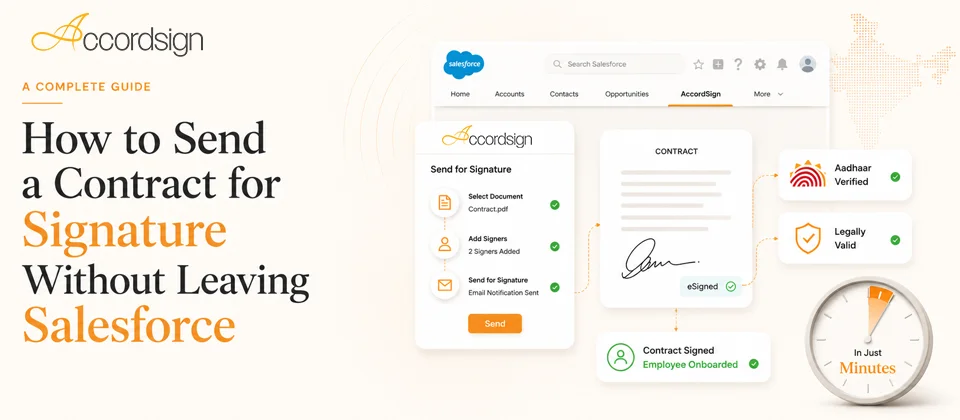
With a native package, the flow collapses to what it always should have been. You’re on the opportunity or account record. You attach or generate the document, the recipient details pull from the Salesforce contact rather than being retyped, you place the signature fields, and you send — without opening another tab. The signer gets a secure link and signs with no account needed. When they’re done, the signed PDF and its audit trail come back onto the Salesforce record, and the status reflects reality automatically.
No export. No copy-paste. No coming back later to update the CRM by hand. The record you started from is the record that ends up complete.
Why this matters more in India
There’s a second gap most global eSignature tools leave open: Aadhaar. If you’re signing with Indian counterparties, Aadhaar eSign is the fastest legally valid way to sign — but the major global signing tools don’t support it at all, which means even a well-integrated connector can’t offer it inside Salesforce. A Salesforce-native package built for India can, so your team gets Aadhaar eSign on the same record, in the same flow, as everything else. (For when to use Aadhaar eSign versus a DSC, see our guide on Aadhaar eSign vs DSC.)
A short checklist for evaluating any Salesforce eSignature option
When you’re comparing tools, the questions that separate native from bolt-on are simple:
- Is it a managed package installed into your org, or an external app connected via API?
- Do recipient details populate automatically from the Salesforce contact, or are they re-entered?
- Does the signed document and its status return to the record without manual updating?
- Can you send without leaving the Salesforce record you’re working on?
- If you operate in India, does it support Aadhaar eSign natively, or not at all?
The answers tell you quickly whether you’re buying signing that lives in your CRM or signing that merely talks to it.
Where Accordsign fits
Accordsign is a native Salesforce managed package — installed directly into your org, not bolted on — so you can send contracts for signature from any record without leaving Salesforce, with recipient details and status flowing automatically. It includes Aadhaar eSign for Indian signers and a standard electronic signature workflow for everyone else, with a full audit trail on every envelope. You can read more about how the Salesforce integration works on our Salesforce page.